What to Know About Canva
Visual communication is at the heart of any organization’s marketing success. Whether you're a senior or retirement community, nonprofit agency, municipality, or recreational organization, the ability to design eye-catching visuals quickly and affordably has become essential. This is where
Canva, a leading online design and marketing platform, stands out.
Since its launch in 2013, Canva has transformed the way people create graphics, presentations, videos, and marketing materials. Here’s what you should know about this powerful, user-friendly platform that is changing the way organizations are engaging with their communities.
A Brief Overview of Canva
Canva was founded in Australia by Melanie Perkins, Cliff Obrecht, and Cameron Adams with a simple mission: to make design accessible to everyone. Traditionally, graphic design requires expensive software and specialized training. Canva eliminates those barriers by offering an intuitive drag-and-drop interface that allows anyone — even those without a design background — to easily produce professional-quality content.
Any organization can utilize Canva to create newsletters and brochures, and then partner with a
print vendor, such as LPi, to produce vibrant communication pieces at no cost!
Canva’s Key Features and Tools
Canva’s greatest strength lies in its user-friendly versatility. A popular core feature is its intuitive drag-and-drop editor. It allows users to move, resize, and edit elements with ease. You can create nearly any type of visual content, including:
- Newsletters
- Flyers
- Social media graphics
- Brochures
- Infographics
- Logos
- Presentations
- Videos
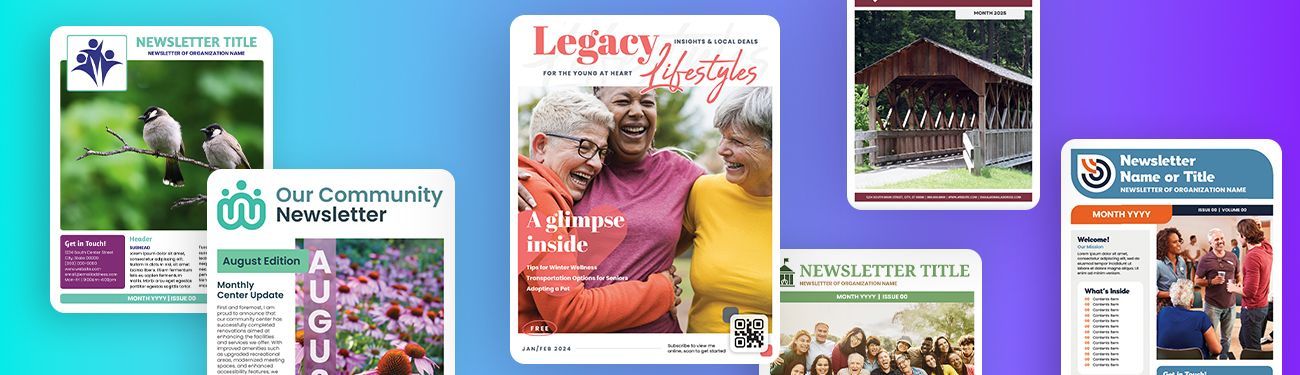
Within Canva, LPi provides customers with beautifully designed publication templates alongside Canva’s vast library of templates. Each template is fully customizable and includes access to stock photos, illustrations, icons, and fonts. Another popular feature of Canva is its Brand Kit, which helps organizations maintain consistency by storing elements such as logos, colors, and fonts in one place.
It also plays nicely with content that users upload to the platform. For example, if you are a regular user of
WeCreate,LPi’s robust content library for nonprofit organizations, images you download to your computer from WeCreate can be easily uploaded to Canva for whatever you’d like to use them.
Canva is Great for Marketing Your Organization
Canva is a lot more than just an easy-to-use design tool. It’s a full-fledged marketing platform that enables users to use consistent branding across every marketing channel, from social media posts and email headers to printed newsletters and flyers. Canva’s templates also help organizations stay on-brand and professional.
Teams can also use Canva to collaborate in real-time by leaving comments and suggestions directly on designs, making it easy to work together.
Canva Pro’s affordable subscription offers access to premium templates, stock photos, and advanced features such as Background Remover and Brand Kits. These types of resources elsewhere require costly software or outsourcing. If you are a nonprofit organization interested in using Canva, you may be eligible for a FREE premium subscription called Canva for Nonprofits!
Canva Has Great AI Options
In recent years, Canva has expanded into AI, as well. Its suite of AI-powered tools, referred to as the Magic Studio, includes features such as:
- Magic Write: Generates text for headlines and other copy.
- Magic Eraser: Removes unwanted objects from images.
- Magic Design: Automatically generates design options from your content.
- Magic Switch: Resizes and reformats designs into different layouts.
While there is a bit of a learning curve, once you master these features, you’ll be able to create everything from videos to background animations.
Partner with LPi for Newsletter Success!
If you’d like to learn more about how to publish your organization’s newsletter or resource guide with LPi using Canva, head over to the
Newsletter Services section of our website!We work with thousands of organizations nationwide to publish beautiful and meaningful publications that their audiences want to read!
Included with LPi’s Newsletter Service is:
- Access to WeCreate, LPi’s custom art and content library
- Printed newsletters at no cost
- Free digital distribution with our online directory
- Complimentary custom-designed newsletter template (Canva-ready!)
- Responsive and reliable customer service with real people
Share
You might also like